How to Check Your iPhone Battery Health
iPhone Battery Health
How to Check Your iPhone Battery Health
(2026 Guide)
What the percentage means, when to replace, and how to make your battery last longer
Every week customers walk in with iPhones that shut down at 40%, overheat for no reason, or barely last until noon. In almost every case, the battery is the culprit — and checking its health takes less than 30 seconds. Here is everything you need to know.
STEP 1 How to check battery health on your iPhone
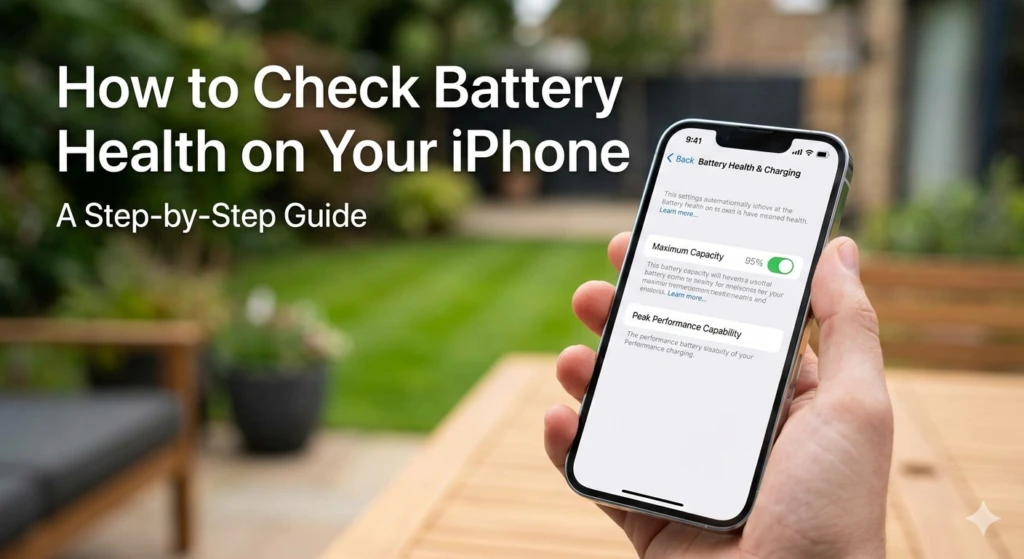
Apple built a battery health monitor directly into iOS. Here is how to find it:
- Open Settings on your iPhone
- Scroll down and tap Battery
- Tap Battery Health & Charging
- Look at the Maximum Capacity percentage at the top
That number tells you how much charge your battery can hold compared to when it was new. A brand new iPhone shows 100%. The number drops gradually with each charge cycle.
Tip
This feature is available on iPhone 6 and later running iOS 11.3 or above. If you do not see Battery Health, update your iOS first.
PART 2 What the percentage actually means
| Maximum Capacity | Status | What to expect |
|---|---|---|
| 100% – 85% | Good | Battery performing as expected. No action needed. |
| 84% – 79% | Fair | Noticeably shorter battery life. Consider replacement soon. |
| Below 79% | Replace | Apple recommends replacement. Performance may be throttled. |
Apple's own threshold for recommending a battery replacement is 80%. Below that, iOS may show a warning message in the Battery Health screen: "Your battery's health is significantly degraded."
Watch out
A battery at 79% does not just mean shorter life. iOS may start throttling your iPhone's processor speed to prevent unexpected shutdowns — meaning your phone gets noticeably slower. This is called Performance Management and it kicks in automatically below a certain threshold.
PART 3 How fast does battery health drop?
Apple designs iPhone batteries to retain up to 80% of their original capacity after 500 complete charge cycles under normal conditions. In real life, most people charge their phone once a day — meaning 500 cycles is roughly 1.5 to 2 years of daily use.
How fast your battery degrades depends on several factors:
- Heat — Leaving your iPhone in a hot car or using it while charging in direct sunlight accelerates degradation faster than almost anything else.
- Charging habits — Frequently charging from 0% to 100% creates more stress than keeping the battery between 20% and 80%.
- Fast charging — Convenient, but harder on the battery over time compared to slow overnight charging.
- Usage patterns — Heavy GPU use (gaming, video) while charging generates heat that degrades cells faster.
- Bangkok heat — This matters more than most people realise. Ambient temperature in Thailand means your iPhone is already operating near the upper edge of its comfort zone every day.
From our technicians
We see iPhones in Bangkok with batteries below 75% after just one year — not because the user did anything wrong, but because the combination of daily charging, frequent fast charging, and ambient heat adds up quickly in a tropical climate. If your battery is dropping faster than expected, heat is usually the main reason.
PART 4 Tips to slow down battery degradation
You cannot stop battery aging — but you can slow it down significantly with a few habits:
- Enable Optimised Battery Charging — Go to Settings → Battery → Battery Health & Charging and turn this on. iOS learns your charging routine and slows charging to 80% until just before you wake up, reducing stress on the cells.
- Avoid charging in direct sunlight or in a hot car — Heat is the number one enemy of lithium-ion batteries. If your phone feels warm while charging, move it somewhere cooler.
- Do not leave it at 100% for hours — Keeping a lithium battery fully charged for extended periods degrades it faster. Unplug once charged.
- Charge before it hits 20% — Deep discharges (near 0%) put more stress on the battery than partial charges do.
- Use a case with ventilation — Thick cases trap heat during charging. If you charge frequently, consider removing the case or using one that does not insulate as much.
PART 5 When to replace your iPhone battery
Battery replacement makes sense in three situations:
- Capacity is below 80% and you notice shorter battery life or unexpected shutdowns.
- iOS shows a Battery Health warning in the Settings screen.
- Your phone throttles performance — apps are slow, the camera is sluggish, or the phone freezes — even though the storage and software are fine.
A battery replacement is one of the most cost-effective repairs you can do. For most iPhone models it restores full-day battery life and full processor speed — making your phone feel new again without buying a new device.
Cost vs. new iPhone
A battery replacement at Dr Smartphone Thailand costs a fraction of a new iPhone. If your phone is otherwise working well — screen is fine, storage is enough, camera is good — a battery replacement is almost always the right call before considering an upgrade.
FAQ Common questions
Can I replace the battery myself?
Technically yes, but iPhone batteries are glued in and require specific tools and adhesive strips to remove safely. An incorrect replacement can damage the display, Face ID components, or the logic board. We recommend professional replacement.
Does Apple use genuine batteries for replacements?
Apple and Apple Authorised Service Providers use Apple-branded batteries. At Dr Smartphone Thailand we use high-quality compatible batteries that match OEM specifications — same capacity, same cycle life. All replacements come with a 3-month warranty.
Will my phone tell me if the battery is not genuine?
On iPhone 12 and later, iOS may show a message saying it cannot verify the battery is a genuine Apple part. This is a software flag — it does not affect how the battery performs. Battery Health monitoring continues to work normally.
How long does a replacement take?
Most iPhone battery replacements are done same-day. Walk in, and we will give you an estimated time on the spot.
Battery running out too fast?
Free diagnostic — we check your battery health and tell you exactly where you stand before recommending anything.
Book a Free Check Walk-ins welcome · Chit Lom, Bangkok