iPhone Screen Replacement: LCD vs OLED, Original vs OEM — And Why Face ID Is So Complicated
iPhone Repair Guide
iPhone Screen Replacement: LCD vs OLED, Original vs OEM — And Why Face ID Is So Complicated
Your iPhone screen cracked. Now you're faced with a confusing menu of options — LCD or OLED? Original or OEM? Cheap screen or genuine Apple? And what about Face ID? At Dr. Smartphone Thailand, we replace iPhone screens every single day. Here's everything you need to know before you get your screen repaired.
Part 1
LCD vs OLED — Which Screen Does Your iPhone Have?
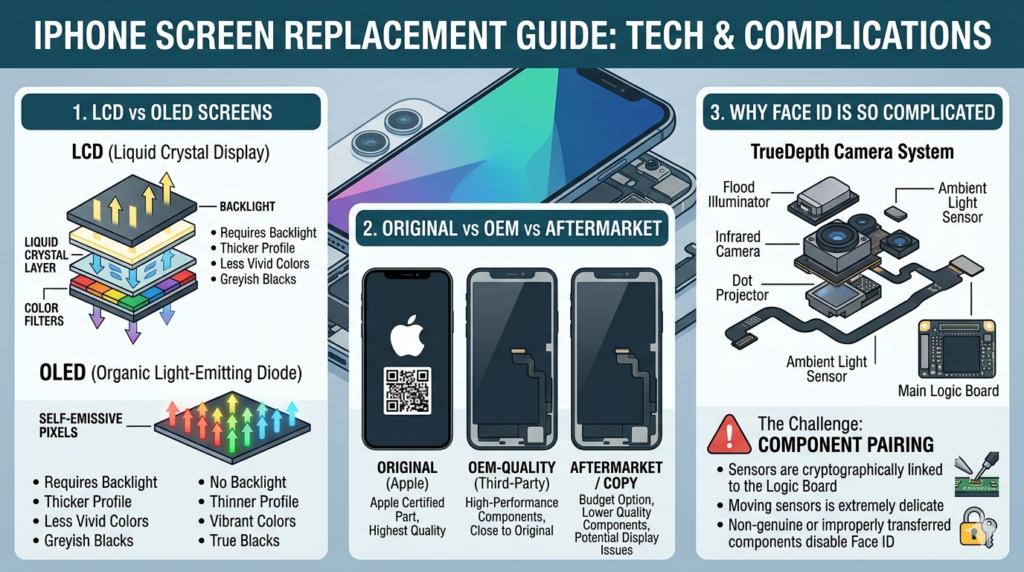
Apple has used two completely different display technologies across the iPhone lineup. Knowing which one you have affects both the repair cost and your replacement options.
📺 LCD — Older iPhones
- iPhone 8, 8 Plus and earlier
- iPhone XR
- iPhone 11
- Uses a separate backlight layer
- Blacks appear dark grey, not true black
- Thicker display assembly
- Generally cheaper to replace
- Still looks good for everyday use
✨ OLED — iPhone X and Newer
- iPhone X, XS, XS Max
- iPhone 12, 13, 14, 15, 16 — all models
- Each pixel produces its own light
- True blacks — pixels turn completely off
- Thinner, more vibrant, higher contrast
- Supports ProMotion 120Hz on Pro models
- More expensive to replace
- Used in all modern iPhones
In short — OLED screens look significantly better, particularly for videos, dark interfaces, and photography. But they cost more to produce and therefore more to replace. If your iPhone is an X or newer, you have an OLED display.
| iPhone Model | Display Type | Screen Size |
|---|---|---|
| iPhone 8 / 8 Plus | LCD | 4.7" / 5.5" |
| iPhone XR | LCD | 6.1" |
| iPhone 11 | LCD | 6.1" |
| iPhone X / XS / XS Max | OLED | 5.8" / 5.8" / 6.5" |
| iPhone 12 series | OLED | 5.4" – 6.7" |
| iPhone 13 series | OLED | 5.4" – 6.7" |
| iPhone 14 series | OLED | 6.1" – 6.7" |
| iPhone 15 series | OLED | 6.1" – 6.7" |
| iPhone 16 series | OLED | 6.1" – 6.9" |
| iPhone 17e | OLED | 6.1" |
Part 2
Original, OEM, and Aftermarket — What's the Difference?
This is the most confusing part of any screen repair — and where many repair shops are not transparent. When you get your iPhone screen replaced, there are three categories of replacement screen available:
A+
Original / Genuine
The exact same screen Apple uses in your iPhone. Either pulled from another device or sourced through Apple's official supply chain. Best quality, most expensive.
B
OEM Quality
Made by the same manufacturers that supply Apple, but sold outside Apple's official channel. Very close to original quality — good choice for cost-conscious repairs.
C
Aftermarket / Cheap Copy
Third-party screens with lower-quality panels. Often washed out colours, poor touch response, and shorter lifespan. Avoid unless budget is extremely tight.
What Dr. Smartphone Thailand Uses
→
Original Pulled Screens
For customers who want the best — we source genuine Apple screens from donor devices. Perfect colour accuracy, True Tone support, and Face ID compatibility.
→
High-Quality OEM Screens
For budget-conscious repairs — we use premium OEM panels from reputable suppliers. Excellent colour and touch accuracy at a lower price point.
→
We Never Use Cheap Copies
We don't stock low-quality aftermarket panels. Every screen we fit meets our quality standard — we stand behind every repair with a warranty.
Part 3
True Tone — What It Is and Why It Matters
If you have an iPhone 8 or newer, your phone has True Tone — a feature that automatically adjusts the white balance and brightness of your screen based on the ambient light in your environment, so the display always looks natural to your eyes.
Here's the catch: True Tone is calibrated to your specific screen at the factory. When you replace your screen with anything other than a genuine Apple screen, True Tone may be lost or reduced in quality. Your phone will display a notification in Settings saying "Unable to verify this iPhone has a genuine Apple display."
⚠️ Important — The True Tone Warning
After any screen replacement on iPhone 11 and newer, you may see a message in Settings → General → About saying your display could not be verified. This is cosmetic only — it does not affect how your phone works, calls, or Face ID. Apple added this as a deterrent to independent repair. It does not mean your screen is dangerous or defective.
At Dr. Smartphone Thailand, we use a calibration tool to restore True Tone on supported models when using genuine pulled screens.
Part 4
Face ID — Why It Fails and Why It's So Hard to Fix
Face ID is one of the most common reasons customers come to us after a screen replacement elsewhere — their Face ID stopped working. Understanding why requires a quick explanation of how Face ID actually works.
Face ID uses Apple's TrueDepth Camera System — a collection of sensors hidden in the notch or Dynamic Island at the top of your screen. These components work together to create a precise 3D map of your face:
The 3 Key Face ID Components
→
Flood Illuminator
An infrared "porch light" that illuminates your face invisibly in the dark so Face ID works in any lighting condition.
→
Dot Projector
Projects over 30,000 invisible infrared dots onto your face to create a precise depth map — the core of Face ID's security.
→
Infrared Camera
Reads the dot pattern and sends the data to the Secure Enclave chip to verify your identity.
Here is the critical problem: all three of these components are cryptographically paired to the logic board of your specific iPhone. This means they are locked together using encryption at the chip level. If any one of them is replaced — even with an identical component from another iPhone — Face ID will stop working.
Why Independent Repairers Can't Fix Face ID
To re-enable Face ID after replacing a TrueDepth component, Apple's proprietary GSX software is required to re-pair the new component to the device. Only Apple Stores and Apple Authorized Service Providers have access to this system. Independent shops — no matter how skilled — cannot access GSX. This is called "parts pairing" and it is a deliberate software lock, not a technical necessity.
The most common reason Face ID breaks during a screen repair is damage to the flood illuminator flex cable — a thin ribbon cable that runs along the top of the display assembly. It can be accidentally torn during disassembly, especially on older iPhones where the adhesive has hardened. This is why choosing an experienced repair shop matters so much.
Part 5
What Can Be Fixed — And What Cannot
Face ID Problems We Can Fix
→
Torn Flood Illuminator Flex Cable
The most common cause. If the flex cable was damaged during a previous repair, we can micro-solder a replacement — keeping your original flood illuminator intact so Face ID is preserved.
→
Water Damage to Face ID Components
Corrosion on the flood illuminator or its circuit path can cause Face ID failure. With ultrasonic cleaning and micro-soldering, we can often restore function.
→
Dot Projector Issues
In some cases, micro-soldering can repair the dot projector circuit without replacing the component — preserving the original pairing.
Face ID Problems We Cannot Fix
→
Replaced TrueDepth Camera Module
If the infrared camera or dot projector was replaced with a new component, Face ID cannot be restored without Apple's GSX pairing system — which only Apple and authorised providers can access.
→
Physically Destroyed Components
Severe physical damage to the TrueDepth module — such as from a severe drop — may mean Face ID cannot be restored by any independent shop.
Part 6
The Right to Repair Problem — And Where It's Heading
Parts pairing — Apple's practice of cryptographically locking components to specific devices — has been one of the most controversial topics in the repair industry. Independent repair advocates have argued for years that it is driven by profit motives, not legitimate security concerns.
The good news is that legislation is starting to change this. Anti-parts-pairing laws have passed in Colorado and Oregon in the US, and the EU's Right to Repair directive includes similar protections. Apple has already made some concessions — with iOS 18, used genuine Apple parts can now be calibrated and reused in repairs without losing most functionality. However, Face ID replacement remains restricted even under the new rules — independent testing has confirmed that Face ID pairing still requires Apple's proprietary tools.
At Dr. Smartphone Thailand, we follow these developments closely and update our capabilities as legislation and Apple's policies evolve. We are committed to being fully transparent with our customers about what is and isn't possible with every repair.
Our Advice Before You Get Your Screen Replaced
Always choose a repair shop that is transparent about which screen they're using — original, OEM, or aftermarket. Ask specifically whether True Tone will be preserved. And if Face ID is important to you, make sure your technician has experience protecting the flood illuminator flex cable during disassembly. At Dr. Smartphone Thailand, we offer free diagnostics so you know exactly what you're getting before we start any repair.
Book Your Free Diagnostic →Need Your iPhone Screen Replaced in Bangkok?
Dr. Smartphone Thailand specialises in iPhone screen replacements — LCD and OLED, all models from iPhone 8 to iPhone 16. We use only original or premium OEM screens, protect your Face ID during every repair, and back every job with a warranty. Walk in or book online.
iPhone Screen Replacement Bangkok →